7 days a week Servicing Sydney and surrounding suburbs.
Mbeya Antennas

Professional Mobile Signal Boosting Sydney for Better Indoor Reception

If your mobile phone works perfectly well in the street but struggles as soon as you walk inside your home, office, warehouse or commercial property, you are dealing with a common indoor coverage problem. Mobile signal boosting in Sydney can help address weak reception, dropped calls and unreliable mobile data where the existing cellular signal is available outside but becomes difficult to use indoors.

Modern buildings can create particularly challenging conditions because concrete, steel, metal roofing, insulation, energy-efficient glass and complex internal layouts can weaken or obstruct radio signals. Industry guidance on business connectivity identifies these materials, distance from cellular infrastructure and internal dead zones as common causes of poor indoor mobile reception.

At Mbeya Antennas, mobile coverage is approached as a practical telecommunications problem rather than simply a matter of buying an amplifier and putting it on a wall. The right solution depends on the signal available at the property, the carrier being used, the size and construction of the building, the areas that need coverage and the type of equipment that can legally operate on the Australian mobile network. That distinction matters in Sydney because the Australian Communications and Media Authority (ACMA) states that ordinary mobile phone boosters are prohibited, while certain cellular mobile repeaters may be operated when authorised by the relevant mobile carrier.

If you are experiencing unreliable mobile reception, the first step is to understand what is actually causing the problem. A professional assessment can help determine whether the issue is weak external coverage, building penetration, internal signal distribution or another network-related condition. Mbeya Antennas provides telecommunications and antenna services across Sydney and surrounding areas, with technicians experienced in residential and commercial installations.

Mobile Signal Boosting in Sydney: What the Service Does

A professional mobile signal solution is designed to make an existing usable cellular signal more accessible inside the areas where reception is weak. In a typical authorised repeater installation, an external antenna receives the available cellular signal, the system processes and amplifies that signal within permitted operating parameters, and an internal antenna distributes coverage through the required indoor area.

The basic concept sounds simple, but achieving reliable results requires more than connecting three pieces of equipment together. The external signal needs to be suitable, the equipment needs to be compatible, and the antenna layout needs to match the building. ACMA describes cellular mobile repeaters as radiocommunications devices that retransmit mobile signals to improve the reliability of mobile services.

That is why mobile signal booster installation should not be treated as a generic DIY purchase. Competing Australian service providers also emphasise the importance of site assessment, antenna positioning and matching the solution to the size and construction of the property. For example, business-focused mobile coverage guidance highlights the difference between smaller premises that may require a simpler solution and larger or structurally complex buildings that may require more distributed coverage infrastructure.

For a Sydney homeowner, the problem might be limited to a bedroom, home office, garage or rear section of the property. For a business, the problem could affect meeting rooms, warehouse floors, basement areas, loading zones or internal offices. The goal is therefore not simply to create a stronger number on a phone’s signal indicator. It is to improve usable mobile coverage in the locations where people actually need to make calls, send messages or use mobile data.

How a Mobile Signal Repeater Works

An authorised cellular repeater generally relies on an external or donor antenna, a repeater or signal-processing unit and one or more internal antennas. The external antenna is positioned where it can access a suitable cellular signal. The system then transfers that signal to the internal distribution equipment, which provides coverage within the target area. This approach can be particularly useful when the signal exists outside the building but is substantially weakened by the structure before reaching rooms inside.

The important point is that a repeater does not magically create mobile network coverage where no usable network signal exists. It works with an available signal and redistributes it more effectively within the property. That is why a professional installer needs to consider the outdoor signal before recommending equipment. MobileCorp’s current guidance similarly explains that signal boosting systems capture an existing signal and redistribute improved coverage inside the building, while larger premises can require more advanced distributed antenna approaches.

The result can be more reliable voice calls and mobile data in areas previously affected by weak reception. However, actual performance depends on the starting signal, network conditions, carrier compatibility, building construction, antenna placement and the system selected. A professional assessment helps separate realistic improvement from unrealistic expectations.

Why You Can Have Good Outdoor Coverage but Poor Indoor Reception

One of the most confusing mobile reception problems is having a strong signal outside your property but poor reception inside. It can seem strange: if the phone works at the front gate, why does it struggle in the middle of the house or office? The answer is often the building itself. Radio signals can be weakened, reflected or obstructed by materials used in modern construction.

Concrete walls, reinforced structures, steel frames, metal roofing, foil-backed insulation and certain energy-efficient glass products can all contribute to difficult indoor propagation. Large commercial buildings can be even more complicated because multiple floors, lift shafts, stairwells, fire doors, plant rooms and dense internal layouts create areas where cellular coverage becomes inconsistent. MobileCorp identifies concrete, steel and Low-E glass among materials that can make indoor mobile coverage difficult.

This is particularly relevant to Sydney properties because buildings vary dramatically between older residential homes, modern apartments, commercial offices, warehouses, workshops and industrial premises. A solution that works well in a small single-level property may not be appropriate for a multi-level commercial building. Professional mobile signal assessment therefore starts with the physical environment instead of assuming that every reception problem has the same cause.

What Causes Poor Mobile Reception in Sydney?

Poor mobile reception is rarely caused by one universal factor. The mobile network, the distance and direction to serving infrastructure, local obstructions and the construction of your building can all affect the signal available at a particular location. Even properties within the same Sydney suburb can experience different reception because their surrounding structures, elevation, orientation and construction are different.

Inside buildings, the problem becomes more noticeable because cellular signals must pass through multiple physical barriers before reaching a handset. A signal that is perfectly usable outdoors can become marginal after travelling through walls, floors and windows. In commercial premises, internal dead zones can also appear in predictable locations such as basements, stairwells, lift cores and enclosed meeting rooms. Current Australian business connectivity guidance identifies these areas as common problem locations.

There is another important distinction: signal strength and network performance are not exactly the same thing. A phone may display reasonable bars while the network is congested or the quality of the radio connection is poor. If reception problems occur only at particular times of day, network congestion may also need to be considered rather than assuming that an indoor repeater is automatically the answer.

Building Materials and Indoor Dead Zones

The construction of a property can have a major influence on mobile reception. Older homes may have relatively straightforward layouts, while newer buildings can contain reinforced concrete, metal framing, foil insulation and specialised glazing that make cellular penetration more difficult. Warehouses and industrial buildings can be particularly challenging because metal structures and large roof surfaces can significantly affect how radio signals propagate.

A common example is an office where employees can make a clear call near a window but lose reception after moving deeper into the building. Another is a warehouse where mobile phones work around the entrance but become unreliable between storage areas. In a basement car park, there may be little usable cellular coverage at all. These are not necessarily handset problems; they can be symptoms of how the available radio signal interacts with the building.

The solution needs to consider where people actually require coverage. Installing an internal antenna in a convenient location is not automatically the same as designing useful coverage throughout a property. Professional signal testing and antenna positioning can identify the areas that need attention and help determine whether a repeater or a more distributed solution is appropriate.

Distance, Terrain and Network Conditions

Distance from cellular infrastructure can also influence the signal arriving at a property. Buildings located farther from serving infrastructure or behind physical obstructions may receive a weaker signal before the signal even reaches the building. Hills, surrounding structures, vegetation and dense urban development can influence propagation as well.

Sydney is a large metropolitan area with a mixture of dense urban environments, suburban streets, industrial areas and outer metropolitan locations. Consequently, two properties using the same mobile carrier can experience different reception. MobileCorp recommends checking the location of nearby cellular infrastructure when investigating poor reception, although proximity to a tower alone does not guarantee good indoor coverage.

Network congestion can create another layer of complexity. If mobile performance deteriorates primarily during busy periods, improving the physical signal may not solve every performance issue. This is why professional advice should begin by identifying the nature of the problem rather than promising that a particular device will fix every type of mobile connectivity issue.

Professional Mobile Signal Solutions for Homes and Businesses

The right mobile reception booster solution in Sydney depends on the property and the problem. A homeowner may need improved coverage in a particular part of the house, while a commercial client may require consistent mobile connectivity across offices, warehouses, retail areas or multiple floors. The size of the area, building materials, available external signal and number of users all influence the design.

Professional service also means considering Australian telecommunications requirements before equipment is supplied or installed. ACMA currently warns consumers against using prohibited mobile phone boosters and explains that cellular mobile repeaters require mobile carrier authorisation.

Residential Mobile Reception Solutions

Poor mobile reception at home can be surprisingly disruptive. If your phone repeatedly drops calls in the kitchen, bedroom, home office or garage, you may start moving from room to room simply to find a usable signal. For people working remotely, that becomes more than an inconvenience because mobile calls, messaging and mobile data can form part of everyday work and personal communication.

A residential assessment can identify where the signal is strongest and where the dead zones occur. If there is a suitable external signal and an authorised repeater solution is appropriate, the system can be designed around the areas where coverage is actually required. This is more useful than choosing a generic device based solely on advertised coverage numbers.

Mbeya Antennas also provides a broader range of residential telecommunications services, so mobile coverage issues can be considered alongside other property connectivity requirements. You can explore the company’s wider telecommunications and antenna services when planning work across your property.

Commercial and Office Mobile Coverage

Reliable mobile reception is increasingly important for Sydney businesses. Staff may depend on mobile phones for customer calls, two-factor authentication, field communication, cloud applications, hotspot connectivity and day-to-day coordination. When reception is unreliable, employees may lose calls, repeatedly reconnect devices or move away from their desks simply to communicate.

Commercial buildings can create especially difficult conditions because concrete cores, steel structures, energy-efficient windows and multiple internal rooms can interfere with cellular signals. Current Australian enterprise guidance highlights these construction factors and recommends assessing the building before choosing between a signal booster and a more extensive distributed antenna system.

A professional installation should therefore be designed around the business’s actual coverage requirements. For a small office, the affected area may be relatively limited. A large multi-level building may require a different architecture altogether. Understanding that distinction helps businesses invest in a solution that matches the physical property rather than purchasing equipment based on generic marketing claims.

Warehouses, Workshops and Large Buildings

Warehouses, workshops and industrial premises frequently present difficult mobile reception conditions. Large metal structures, high ceilings, machinery, internal partitions and limited external windows can all contribute to coverage problems. Employees may need mobile connectivity across loading areas, storage zones, offices, workshops and external workspaces, making a single internal antenna insufficient in some circumstances.

For larger buildings, coverage planning becomes particularly important. Fixtel’s current discussion of large-building mobile coverage highlights the role of walk-through testing and antenna placement in identifying weak areas before and after installation. MobileCorp similarly notes that larger or structurally complex sites may require distributed antenna systems rather than relying on a simple booster arrangement.

This is where professional advice provides value. Rather than asking which booster has the biggest advertised number, the more useful question is: what type of mobile coverage system is appropriate for this building? The answer should come from measurements, building conditions and carrier requirements.

4G and 5G Mobile Signal Improvement

Modern mobile users often ask specifically about 4G and 5G signal boosters in Sydney. The answer depends on the network frequencies available at the property, the device being used and the authorised equipment that can operate on the relevant carrier network. Not every repeater supports every band or every form of 5G service, so buying equipment based simply on the words “4G/5G” can lead to unrealistic expectations.

A professional approach starts by identifying the available cellular service and the areas where reception is failing. Some properties may have usable 4G but limited 5G penetration indoors. Others may have a strong 5G signal near a window but poor coverage deeper inside the building. The objective is to improve reliable connectivity, not simply to pursue a particular network generation regardless of the conditions.

Current business guidance also explains that the suitability of a booster depends on the frequency bands in use and the solution deployed. This makes assessment particularly valuable when customers want to improve mobile data as well as voice calls.

Does a Signal Solution Improve 4G and 5G?

An authorised repeater may improve mobile connectivity where the required cellular signal is available and the equipment supports the relevant network service. However, there is no universal guarantee that every 4G or 5G service will be amplified in every property. Network technology, carrier requirements, frequency bands, external signal quality and internal antenna design all matter.

For some properties, improving a usable 4G signal may produce a more noticeable real-world improvement than attempting to target a weak 5G service that cannot reliably penetrate the building. For other locations, a compatible 5G solution may be appropriate. This is why professional recommendations should be based on measurements rather than simply selecting a product from an online marketplace.

If you are unsure whether your issue is related to 4G, 5G, indoor penetration or network availability, a site assessment can help clarify the problem before installation.

Why External Signal Quality Matters

A repeater needs something useful to receive. If there is no suitable cellular signal available outside the building, simply installing a more powerful internal device will not manufacture network coverage. This is one of the most important concepts customers should understand before purchasing mobile signal equipment.

The external antenna therefore plays a critical role. Its location, height, orientation and surrounding obstructions can affect the quality of the signal presented to the system. Internal antenna placement then determines how effectively the available signal is distributed through the required spaces.

This is why professional installers consider both sides of the system: what signal is available outside and where coverage is needed inside. A solution designed around those two factors is more likely to deliver useful results than an installation based purely on advertised amplifier gain.

Mobile Signal Booster Installation in Sydney

A professional mobile signal booster installation in Sydney should begin with investigation rather than equipment selection. Before recommending a system, an installer needs to understand the property, identify the problem areas and determine what type of authorised solution may be appropriate. This is especially important in Australia because ACMA regulates cellular repeaters and prohibits ordinary mobile phone boosters.

The installation itself can involve external antenna mounting, cable routing, repeater placement and internal antenna positioning. Commercial properties may require multiple internal antennas or more advanced distributed coverage infrastructure. The installation should also account for practical issues such as cable paths, access, weather exposure and the structure of the building.

Site Assessment and Signal Testing

Testing helps turn a vague complaint such as “my phone has bad reception” into a measurable problem. A professional assessment can identify where signal quality is acceptable and where it deteriorates. The installer can then consider whether the issue is primarily external signal availability, building penetration, internal distribution or another network condition.

Walk-through testing is particularly useful in commercial properties because dead zones are not always obvious from a floor plan. A basement, stairwell, warehouse corner or internal office can behave very differently from the area immediately outside the building. Fixtel’s current guidance specifically discusses pre- and post-installation walk testing for larger in-building coverage projects.

The objective is simple: design around actual conditions. This reduces the risk of installing equipment in the wrong location or expecting a single antenna to cover areas that require a more comprehensive system.

Antenna Placement and System Design

Antenna placement can make a major difference to the performance of a mobile coverage system. The external antenna needs access to a suitable signal, while internal antennas need to be positioned to distribute coverage effectively through the target areas. Cable length, building structure and the number of internal coverage zones can also influence the final design.

For smaller properties, the system may be relatively straightforward. For large commercial premises, multiple floors or difficult construction, a distributed antenna approach may be more appropriate. MobileCorp’s current guidance makes the same distinction between smaller sites suited to simpler booster arrangements and larger or more complex premises where a DAS may be required.

A professional installation therefore focuses on coverage where it matters, not simply installing equipment wherever there is convenient roof or wall access.

Are Mobile Signal Boosters Legal in Australia?

This is an important question for anyone searching for a mobile signal booster in Sydney. The terminology used online can be confusing because “booster,” “repeater” and “signal amplifier” are sometimes used interchangeably, even though Australian regulation treats different devices differently.

Current ACMA guidance states that mobile phone boosters are prohibited and warns against possessing, operating or supplying them. ACMA also explains that cellular mobile repeaters can be used in certain circumstances, but operation requires written permission from the relevant mobile phone carrier.

That means customers should not simply purchase a cheap online device and assume that because it is advertised as a “4G/5G booster” it is legal to operate in Australia. ACMA advises consumers to check that a repeater is authorised and to be cautious of products sold online that may not meet Australian requirements.

Understanding Authorised Mobile Repeaters

An authorised cellular mobile repeater is designed to operate within the relevant regulatory and carrier framework. ACMA maintains information about exempt repeaters, including the manufacturer, model and carrier associated with the exemption. Even where a repeater is exempt from certain supply requirements, ACMA states that users still need written permission from their mobile carrier to operate it on the carrier’s network.

This is why professional advice is valuable. The objective should not be to find the cheapest amplifier available online. It should be to identify a legal, suitable and properly designed mobile coverage solution for the property.

ACMA’s current guidance also warns that unauthorised repeaters can interfere with mobile networks and potentially disrupt important communications. Customers should therefore verify the equipment and authorisation requirements with their carrier and installer before proceeding.

Why Choose Mbeya Antennas for Mobile Signal Solutions?

Choosing an installer for mobile coverage is about more than purchasing hardware. The installation needs to fit the building, the intended coverage area and the customer’s actual connectivity requirements. Mbeya Antennas is a family-owned telecommunications and antenna business servicing Sydney and surrounding areas, with a stated history of more than 15 years of combined experience and technicians who are licensed and insured.

Mbeya Antennas also provides a broader range of telecommunications, antenna, data and security services. That wider technical background can be useful when mobile reception forms part of a larger property connectivity project rather than being an isolated issue. You can learn more about the company through its Why Choose Us page before requesting service.

The business also states that it provides free quotes for residential and commercial customers. For customers dealing with uncertain reception problems, an initial conversation can help establish whether a mobile coverage assessment is appropriate.

Sydney and Surrounding Areas

Mbeya Antennas services Sydney and surrounding areas, supporting customers with telecommunications and antenna requirements across residential and commercial properties. This local focus matters because mobile reception can vary substantially between properties, even within the same metropolitan region.

Whether the problem is occurring in a home, office, warehouse, workshop or another building, the starting point should be understanding the specific conditions at the site. Sydney properties can have very different construction types and surrounding environments, so a professional solution should not rely on a one-size-fits-all assumption.

If you are already comparing different services, you can also review the company’s broader Services page to see how mobile connectivity fits alongside its other telecommunications and technical services.

When Should You Consider Professional Mobile Signal Help?

You may need professional assistance when poor reception becomes a repeated problem rather than an occasional inconvenience. Common warning signs include dropped calls inside specific rooms, slow mobile data, messages that fail to send, unreliable hotspot performance or having to stand near a window to maintain a conversation. If the problem occurs consistently in the same parts of a property, the building environment should be investigated.

Businesses have additional reasons to address poor mobile coverage. Employees may depend on mobile calls to communicate with customers, suppliers and colleagues, while mobile data can support authentication, cloud applications, field operations and other everyday processes. In larger buildings, a small coverage problem can affect an entire department or operational area.

It is also sensible to investigate before purchasing equipment. ACMA recommends contacting the mobile carrier when reception is poor because network issues may also contribute to the problem. If the carrier confirms that the service is available but the property has indoor coverage difficulties, a professional assessment can help determine what type of solution may be appropriate.

What to Expect From a Professional Service

A professional mobile signal service should begin with questions. Which carrier do you use? Where does the signal fail? Does reception improve outside? Is the problem limited to one room or spread throughout the property? Is the building residential, commercial, industrial or multi-level? What devices and services need coverage?

The answers help establish whether a repeater, another connectivity approach or a more comprehensive in-building coverage system is appropriate. For larger properties, professional assessments may involve signal measurements, walk-through testing, coverage mapping and consideration of multiple antenna locations. Australian industry guidance identifies site assessment and coverage mapping as important parts of professional in-building mobile coverage design.

For Sydney homeowners and businesses, the most useful result is not simply “more bars.” The real objective is dependable mobile connectivity in the rooms, workspaces and operational areas where it matters. If poor reception is affecting your home or business, speaking with a qualified local technician can help determine what is technically possible and what equipment can be legally used.

Conclusion

Poor mobile reception can turn a perfectly usable phone into a frustrating communication tool, particularly when the problem occurs inside a home, office, warehouse or commercial building. Mobile signal boosting in Sydney can provide a practical way to improve indoor coverage when a suitable external cellular signal exists but building conditions prevent that signal from being used effectively indoors. The right solution depends on the property, carrier, available signal, construction, coverage area and authorised equipment.

The Australian regulatory side should never be overlooked. ACMA currently distinguishes prohibited mobile phone boosters from authorised cellular mobile repeaters, and written mobile carrier permission is required for operating a cellular repeater on a carrier’s network. This makes professional assessment and equipment selection particularly important.

Mbeya Antennas provides telecommunications and antenna services across Sydney and surrounding areas, with residential and commercial experience and a wider range of technical services. If you are dealing with dropped calls, poor indoor reception or mobile dead zones, the sensible first step is to identify what is causing the problem before selecting a solution.

Frequently Asked Questions

1. How can I improve poor mobile reception inside my Sydney home?

Start by identifying whether the signal is weak outside the property or whether the building is blocking an otherwise usable signal. If reception is noticeably better outdoors, building penetration may be contributing to the problem. Depending on the carrier, signal availability and property layout, an authorised cellular repeater or another connectivity solution may be considered. ACMA recommends contacting your mobile carrier about reception problems before using a repeater.

2. Are mobile phone signal boosters legal in Sydney?

You need to be careful with the terminology. ACMA currently states that mobile phone boosters are prohibited in Australia, while certain cellular mobile repeaters can be legally operated when authorised by the relevant mobile carrier. Do not assume that a device advertised online as a “4G/5G booster” is automatically legal. Check the device and authorisation requirements with your carrier before installation.

3. Will a mobile signal booster improve 4G and 5G?

It depends on the authorised equipment, supported frequency bands, carrier and signal available at the property. A repeater cannot create cellular coverage where there is no suitable signal to capture. A professional assessment can determine what type of signal is available and whether an authorised solution can improve coverage in the required areas.

4. Why is my mobile reception good outside but poor inside my building?

Building materials are a common reason. Concrete, steel, metal roofing, foil-backed insulation and some energy-efficient glass can weaken or obstruct cellular signals. Larger buildings can also have dead zones around basements, lift cores, stairwells and internal rooms. Current Australian business connectivity guidance identifies these construction and layout factors as common contributors to poor indoor mobile coverage.

5. Can Mbeya Antennas help with mobile reception problems in Sydney?

Mbeya Antennas provides telecommunications and antenna services across Sydney and surrounding areas, including residential and commercial work. If you have persistent mobile reception problems, the appropriate starting point is to discuss the property, carrier, affected areas and available signal so the required solution can be assessed rather than selecting equipment based only on online product claims.

CCTV Security Systems for Homes & Businesses in Sydney

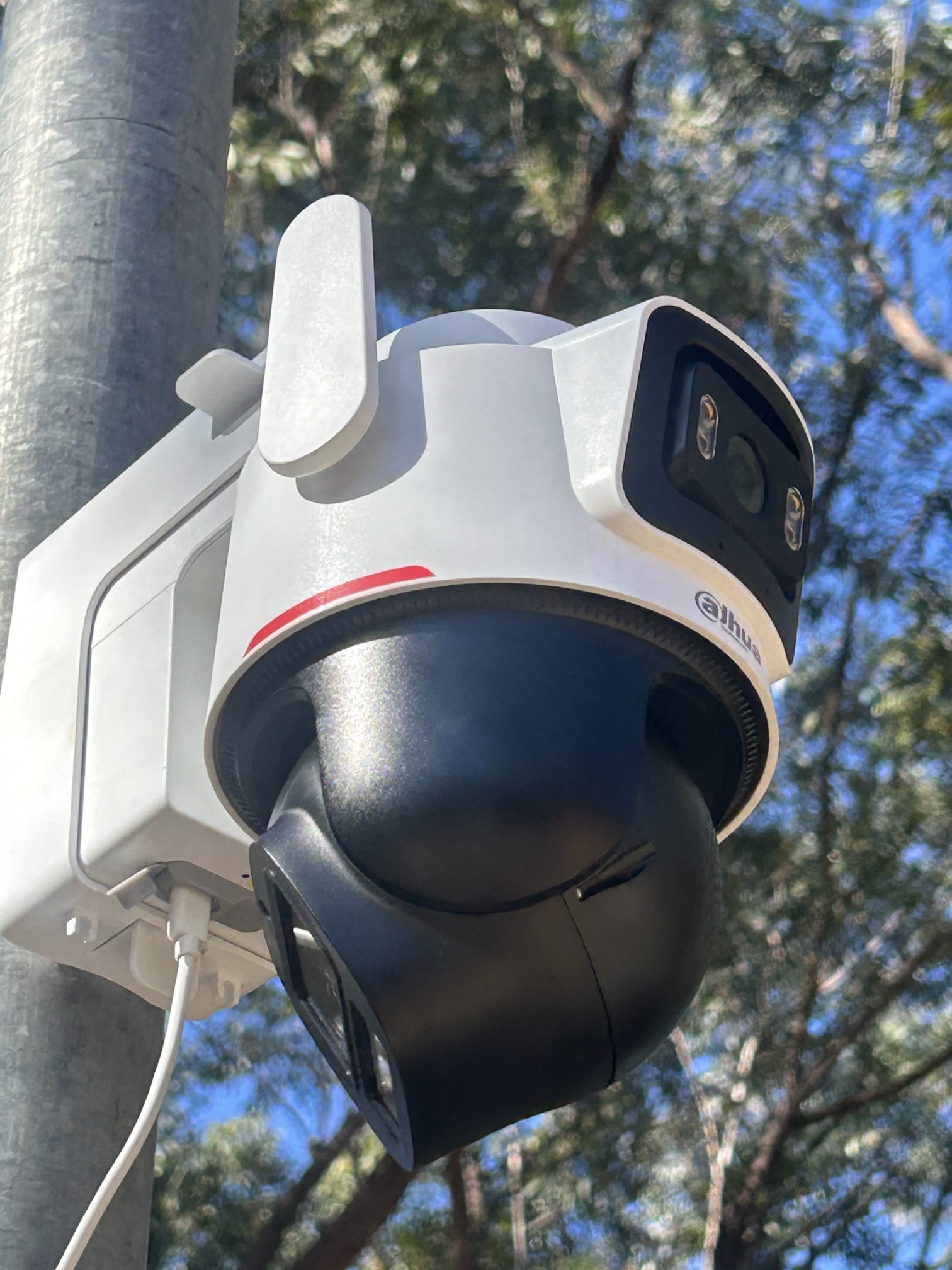
Security cameras have become an important part of protecting homes, offices, shops, warehouses and other properties across Sydney. A properly designed CCTV system can help you monitor important areas, record activity and improve visibility around your property. But buying a few cameras and pointing them at the building is not always enough. Camera type, positioning, lighting, recording, connectivity and ongoing reliability all affect how useful your security system will be.

Mbeya Antennas provides CCTV security systems in Sydney and surrounding areas for residential and commercial properties. Our approach starts with understanding the property and the areas you want to protect before recommending a practical solution. Whether you need a new CCTV installation, additional cameras or an upgrade to an existing system, we can help you choose and install equipment suited to the site.

Looking for Professional Mobile Signal Boosting in Sydney for Better Indoor Reception?

A good CCTV system should work as part of your wider security strategy rather than operate as an isolated device. Cameras can provide visual verification, while alarms can detect unauthorised entry and alert you to potential incidents. For businesses, surveillance can also help monitor entrances, customer areas, stockrooms, loading zones, parking areas and other important parts of the premises.

Why CCTV Matters for Sydney Properties

Every property has different security requirements. A suburban house may need cameras covering the front entrance, driveway, garage and backyard, while a retail store may require coverage of entrances, point-of-sale areas, aisles, storage rooms and external access points. A warehouse or commercial site can require a completely different approach because of its size, vehicle movement, multiple access points and operating hours.

This is why CCTV should be planned around the property rather than selected purely by camera price. A camera with excellent specifications will not provide useful footage if it is installed in the wrong location or aimed toward glare. Similarly, a system with plenty of cameras can still leave important blind spots if the installation has not been properly planned.

For Sydney properties, outdoor equipment also needs to be selected and positioned with local conditions in mind. Direct sunlight, rain, heat and exposure to the elements can affect equipment and image quality. A professional installation considers these practical details before cameras and cabling are installed.

CCTV Security Systems We Install

Camera Installation

Mbeya Antennas can help with CCTV solutions for different property types and security requirements. The right system depends on the size of the property, the number of areas requiring coverage, available network infrastructure, recording requirements and whether remote monitoring is required.

Rather than treating every installation as the same, the system can be configured around the areas that matter most to you. This can include entrances, driveways, garages, side paths, backyards, car parks, commercial entrances, stock areas and other vulnerable locations.

Indoor and Outdoor Security Cameras

Indoor and outdoor cameras have different installation requirements. Indoor cameras can be used to monitor entrances, hallways, offices, reception areas, retail spaces and other internal locations. Outdoor cameras need suitable positioning and protection from weather while maintaining a useful viewing angle.

Different camera designs can also serve different purposes. Dome-style cameras can provide a relatively discreet option for indoor or covered areas, while bullet-style cameras can provide visible surveillance around external areas. Turret cameras are another practical choice for many residential and commercial installations because their positioning can be adjusted to suit the required viewing area.

The objective is not to install the same camera everywhere. It is to select the right security camera for each location so that the complete system provides useful coverage without unnecessary equipment.

IP CCTV and Network Cameras

Modern IP CCTV systems use network connectivity to transmit video between cameras and recording equipment. This provides flexibility when designing a multi-camera security system and can support features such as high-resolution video, remote viewing and smart detection, depending on the equipment selected.

IP cameras can be particularly useful for businesses that already have suitable network infrastructure. However, the network needs to be planned properly. Cabling, switches, power requirements and bandwidth can all influence system performance.

A professional installation helps ensure that cameras are connected correctly and that the recording system can reliably receive footage from the installed devices. For larger properties, this planning becomes even more important because multiple cameras may operate continuously.

CCTV Recording and Remote Viewing

Recording is one of the most important parts of a CCTV system. A camera that shows live video but does not retain useful footage may not provide the level of security a property owner expects.

Depending on the system, recordings can be stored using a dedicated recorder such as an NVR, with storage capacity selected according to the number of cameras, recording quality, recording schedule and retention requirements. Motion-based recording can also be considered where appropriate.

Remote viewing can provide another layer of convenience. When configured correctly, property owners can check cameras through a compatible mobile application or other remote interface. This can be useful when you are away from home, managing a business remotely or simply want to check what is happening around the property.

Choosing the Right CCTV System

There is no single CCTV system that is automatically the best choice for every Sydney property. The right solution depends on what you want the cameras to achieve.

Start by asking a simple question: What do you actually need to see?

If your priority is knowing who is approaching your front door, the camera needs to provide a suitable view of the entrance. If you need to monitor vehicles entering a driveway, the camera needs to be positioned and selected for that purpose. If you operate a warehouse, the system may need to cover large areas while also providing detailed footage at specific access points.

This approach prevents you from spending money on features that do not provide practical value.

Wired vs Wireless CCTV

Both wired and wireless CCTV systems can be useful, but they solve different installation challenges. Wired systems are generally well suited to permanent installations where reliable connectivity and continuous operation are priorities. They are particularly practical for larger systems with multiple cameras.

Wireless cameras can provide flexibility where running cable is difficult. They may be useful for particular areas, detached structures or situations where extensive cabling would be impractical. However, wireless performance depends on network coverage, interference, power availability and the specific equipment being used.

For a permanent multi-camera installation, a properly planned wired system can provide a dependable foundation. For smaller or difficult-to-cable areas, wireless equipment may provide a useful alternative.

The important point is not to choose wireless simply because it sounds easier. The property should determine the technology.

Camera Resolution and Night Vision

Resolution affects how much detail a camera can capture. Higher-resolution cameras can provide clearer images, but resolution alone does not guarantee useful footage.

Lens selection, camera positioning, lighting, distance and image processing also matter. A high-resolution camera aimed at a poorly lit area may not produce the identification detail you expect.

Night performance is equally important because security incidents do not only happen during daylight hours. Outdoor cameras should be selected according to the available lighting and the distance that needs to be monitored.

Features such as infrared night vision, low-light performance and smart illumination can improve visibility after dark. During installation, cameras should also be tested in realistic lighting conditions rather than assuming that daytime performance represents the entire system.

CCTV Camera Placement in Sydney

Camera placement is one of the biggest factors separating a useful CCTV installation from a poorly planned one. Even expensive cameras can leave security gaps if they are mounted too high, pointed toward bright light or positioned without considering how people and vehicles move around the property.

The installation should focus on entry points, vulnerable areas and useful viewing angles. It should also avoid unnecessary coverage that creates privacy concerns or wastes recording capacity.

Residential Camera Placement

For a typical Sydney home, important areas may include the front door, driveway, garage, side access, backyard and rear doors. These areas can provide visibility around common approaches to the property.

The front entrance is particularly useful because it can provide footage of visitors and activity around the main access point. A driveway camera can help monitor vehicles and movement, while cameras covering side gates and rear access can reduce blind spots around less visible parts of the property.

Camera height also matters. Mounting a camera too low can make it easier to interfere with, while positioning it too high may reduce useful facial detail. The ideal position depends on the camera lens, property layout and the area being monitored.

A professional assessment can help balance coverage, visibility and physical security.

Commercial CCTV Camera Placement

Commercial properties often require more structured CCTV planning. A shop may need coverage around entrances, customer areas, registers and stockrooms, while an office may prioritise reception, entrances, corridors and restricted areas.

Warehouses and industrial sites can require coverage of loading docks, vehicle access, perimeter areas and storage locations. Construction sites may have different requirements again, particularly where equipment and materials are stored outside.

For commercial CCTV, it is useful to separate the property into security zones. Each zone can then be assessed for the type of camera, viewing distance, lighting, recording requirement and potential blind spots.

This approach produces a more organised surveillance system and makes future expansion easier.

Professional CCTV Installation Sydney

Installing CCTV involves more than drilling holes and connecting cameras. A professional installation should consider camera locations, cable routes, network connectivity, recording equipment, power, weather exposure and future maintenance.

Mbeya Antennas provides CCTV installation for Sydney and surrounding suburbs, with solutions designed around the property rather than a one-size-fits-all package.

Our technicians can assess the areas requiring coverage and help determine an appropriate system. The aim is to leave you with equipment that is correctly positioned, connected and ready to use.

Our CCTV Installation Process

A successful CCTV installation starts with understanding the property. We consider the areas you want to monitor, existing infrastructure, access points, lighting and any specific security concerns.

The installation process can include:

  1. Property and security assessment to identify important areas and potential blind spots.
  2. Camera selection based on location, viewing distance, lighting and required features.
  3. Camera positioning to achieve useful coverage while reducing unnecessary overlap.
  4. Cable and network planning for reliable communication between cameras and recording equipment.
  5. Secure installation of cameras, recording equipment and associated hardware.
  6. System configuration including recording and relevant remote-access functions.
  7. Testing of cameras during available lighting conditions to confirm coverage and image quality.

The final step should never be overlooked. Each camera needs to be checked from the perspective of what you actually want to see.

CCTV Upgrades and Replacement

You do not always need to replace an entire CCTV system when something becomes outdated. Depending on the existing equipment, it may be possible to upgrade selected cameras, recording hardware, storage or network components.

An upgrade can be useful when older cameras provide poor night images, the recording system has limited capacity, remote viewing is outdated or additional areas need to be covered.

However, compatibility matters. Existing cameras, recorders and network equipment may not always work together as expected. A professional assessment can help determine whether upgrading individual components makes sense or whether a complete replacement would provide better long-term value.

Commercial CCTV Security Systems

Businesses have different security priorities from residential properties. A commercial CCTV system may need to operate continuously, cover multiple entrances and provide footage across large or complex premises.

Our commercial CCTV security systems can be planned for shops, offices, warehouses and other business environments in Sydney and surrounding areas. The installation can focus on the areas that matter most to your operations, including entrances, customer spaces, storage areas, staff-only zones, vehicle areas and external access points.

A commercial CCTV system can also support incident investigation. If a theft, property damage or unauthorised access event occurs, recorded footage can help establish what happened and when it occurred.

CCTV for Shops, Offices and Commercial Sites

Retail businesses can use CCTV to monitor entrances, sales areas, stockrooms and other important zones. Offices may require surveillance around entrances, reception areas, server or equipment rooms and restricted-access locations.

For warehouses and larger commercial sites, the challenge is often coverage. A small number of cameras positioned strategically may cover critical areas, while additional cameras may be required around perimeter or loading zones.

The system should be designed around your operating environment. A camera that works well inside an office may not be the right choice for an outdoor loading area.

This is where professional planning adds value: the goal is useful security coverage, not simply a higher camera count.

Commercial Alarm Systems and CCTV Integration

CCTV and alarms perform different functions, and combining them can create a stronger security setup. Cameras provide visual information, while an alarm system can detect events such as unauthorised entry through doors, windows or designated areas.

Mbeya Antennas also provides commercial alarm systems for businesses that require intrusion detection alongside video surveillance.

Integrating CCTV and alarms can make it easier to understand what triggered a security event. Instead of receiving an alarm notification without knowing what happened, CCTV may provide visual information that helps verify activity around the property.

Combining Cameras and Intrusion Detection

A combined security system can be useful for businesses that want multiple layers of protection. For example, an alarm may detect an unauthorised door opening while a nearby CCTV camera records the surrounding area.

Alarm systems can be designed using different detection devices and can include wired or wireless components depending on the property. The appropriate solution depends on the building, access points and security requirements.

Mbeya Antennas’ existing security offering includes both alarm systems and CCTV, allowing these technologies to be considered together rather than as completely separate installations.

For a business owner, this can simplify the security planning process. Instead of trying to coordinate unrelated systems, you can discuss your CCTV and alarm requirements as part of one broader security strategy.

CCTV Privacy and Responsible Installation

CCTV should be installed responsibly. The objective is to protect your property without unnecessarily recording private areas that are outside your legitimate security requirements.

Camera angles should therefore be planned carefully. Avoid directing cameras toward areas where people have a reasonable expectation of privacy, and consider how neighbouring properties may appear within the camera’s field of view.

Audio recording also deserves particular attention because rules around audio can differ from video surveillance requirements. If your cameras include microphones, make sure the feature is appropriate for your intended use and complies with applicable Australian and NSW requirements.

For commercial properties, businesses should also consider appropriate policies, signage and access controls for recorded footage.

A professional installer can help identify practical privacy considerations during the planning stage, but property owners and businesses remain responsible for using surveillance systems appropriately.

Why Choose Mbeya Antennas

Choosing a CCTV installer is about more than buying cameras. The quality of the installation, cable work, camera positioning, configuration and after-installation support can affect the system for years.

Mbeya Antennas is a family-owned business with more than 15 years of combined experience and provides services across Sydney and surrounding regions. The business states that its technicians are qualified, licensed and insured, with ACMA cabling licensing for applicable telecommunications work.

The existing security service offering includes CCTV installation, alarm systems, business security, home security, video intercom and access control, and smart security solutions.

We also provide free quotes for residential and commercial customers. This gives you an opportunity to discuss your property, security priorities and installation requirements before deciding on the most suitable solution.

Most importantly, the installation should be practical. The system needs to be positioned properly, easy to use and suitable for the property rather than overloaded with unnecessary features.

CCTV Security Systems Across Sydney

Mbeya Antennas services Sydney and surrounding suburbs, providing security, antenna, data and telecommunications solutions for residential and commercial customers.

If you are upgrading an existing CCTV system, building a new home security setup or securing a commercial property, the first step is to identify the areas that require protection. From there, camera types, recording requirements, cabling and additional security technologies can be considered.

Our broader service range also includes antenna installation, TV services, satellite installation and data services. This means CCTV and security installations can be considered alongside other cabling and technology requirements where appropriate.

For businesses, we can also discuss commercial CCTV and alarm requirements as part of a wider property security setup.

If you are unsure how many cameras you need or which type is appropriate, you do not have to work it out alone. A site assessment can help turn a general security concern into a practical installation plan.

Frequently Asked Questions

How much does CCTV installation cost?

The cost of CCTV installation depends on the number of cameras, camera type, resolution, recording requirements, cable length, property layout and installation complexity. A small residential system will normally have very different requirements from a multi-camera commercial installation. Rather than relying on a generic price, it is better to assess the property and determine the equipment and installation work required. Mbeya Antennas can provide a quote based on your specific CCTV requirements.

How many cameras does a property need?

There is no fixed number of cameras that suits every property. A smaller home may need cameras covering the front entrance, driveway, rear access and backyard, while a larger property may require additional cameras for side paths, garages and other vulnerable areas. Commercial properties can require significantly more coverage depending on their layout and operations. The goal should be to cover important areas effectively rather than simply installing as many cameras as possible.

Can CCTV be viewed remotely?

Many modern CCTV systems support remote viewing through a compatible smartphone application or other remote-access platform. Whether remote viewing is available depends on the cameras, recorder, network connection and system configuration. A professional installation can configure the appropriate equipment and help ensure the system is connected correctly. Remote access should also be secured using strong account credentials and appropriate security settings.

Is wired CCTV better than wireless CCTV?

Neither option is automatically better for every property. Wired CCTV is often suitable for permanent installations where stable connectivity and continuous operation are important. Wireless CCTV can provide flexibility in areas where running cable is difficult. The best choice depends on the building, network conditions, power availability, number of cameras and installation requirements.

Can CCTV and alarm systems work together?

Yes. CCTV and alarm systems can complement each other by providing different types of security information. An alarm can detect a potential intrusion, while CCTV can provide visual information about activity around the property. Combining the two can be particularly useful for businesses and properties requiring layered security. The exact integration available depends on the equipment and system configuration.

Do I need CCTV for my business?

CCTV can be useful for businesses that need to monitor entrances, stock, staff-only areas, customer spaces, vehicles, equipment or external areas. The value depends on the nature of the business and its security risks. A properly planned system can provide visibility and recorded evidence when incidents occur. Commercial CCTV can also be combined with alarm systems and other access-control technologies.

Can old CCTV systems be upgraded?

In many cases, parts of an existing CCTV system can be upgraded instead of replacing everything. However, compatibility between cameras, recorders, cabling and network equipment needs to be checked first. If the existing system is significantly outdated, replacing the complete system may provide better performance and easier maintenance. An assessment can help determine the most practical option.

Where should outdoor CCTV cameras be installed?

Outdoor cameras should generally focus on important access and activity areas such as entrances, driveways, garages, gates, side paths and rear access points. The camera should be positioned to provide a useful view without unnecessary glare, obstruction or privacy issues. Height, viewing angle and lighting all affect the final result. Professional installation can help reduce blind spots and improve coverage.

Conclusion

A CCTV system is only as useful as the planning behind it. The right cameras, recording equipment and technology need to be matched with the property, lighting, access points and security objectives. Whether you are protecting a Sydney home, retail business, office, warehouse or another commercial property, careful camera placement and reliable installation can make a significant difference.

Mbeya Antennas provides CCTV security systems in Sydney and surrounding areas, including residential CCTV, commercial CCTV, CCTV upgrades and security solutions that can work alongside alarm systems. Our approach is focused on practical installation, appropriate equipment and coverage that makes sense for the property.

If you are considering CCTV installation, upgrading an existing surveillance system or combining CCTV with a commercial alarm system, contact Mbeya Antennas to discuss your requirements and request a quote.

Starlink vs NBN in Australia: Which Is Best for Your Home? 2026 Guide

Starlink vs NBN in Australia is no longer a simple question of choosing between “old broadband” and “new satellite internet.” Both technologies have changed significantly, and the right choice depends heavily on where you live, which NBN technology is available at your address, how many people use the connection, and what you actually do online. A household in metropolitan Sydney with a strong Fibre to the Premises connection has a very different set of options from a rural property where fixed-line broadband is unavailable or unreliable.

NBN Co has also expanded its higher-speed fixed wireless options, while Starlink has become an important alternative for Australians outside the reach of traditional fixed-line services. The ACCC’s final Measuring Broadband Australia report, released in June 2026, found that fixed-line NBN connections averaged 99.4% of their plan download speed during busy evening periods, showing just how strong a good fixed-line NBN connection can be.

At the same time, the ACCC has previously measured Starlink as a viable high-speed alternative for regional and remote households. So, is Starlink better than NBN? Not necessarily. Is NBN always better than Starlink? Definitely not. The smarter approach is to compare the technology available at your specific property rather than choosing based on advertising alone.

Starlink vs NBN: What Is the Difference?

The biggest difference between Starlink and NBN is the way the internet connection reaches your property. NBN is Australia’s national broadband network and uses several access technologies, including fibre, HFC, fixed wireless and satellite services. A fixed-line NBN service physically connects your premises through network infrastructure, although the exact technology used can vary significantly between addresses.

Starlink takes a completely different route: a Starlink dish at your property communicates with satellites in low Earth orbit, which then connect the service to the wider internet. That difference matters because physical infrastructure and satellite connectivity respond differently to distance, weather, congestion, network design and local conditions. For a homeowner, however, the technical distinction becomes much simpler: NBN can be the better option when you have a strong fixed-line connection, while Starlink can be an excellent alternative when conventional broadband is unavailable, slow or unreliable.

How NBN Works

NBN isn’t one single type of connection, and this is one of the most important points to understand before comparing it with Starlink. Depending on the property, you may have Fibre to the Premises (FTTP), Fibre to the Building (FTTB), Fibre to the Node (FTTN), Hybrid Fibre Coaxial (HFC), fixed wireless or satellite. These technologies can provide very different real-world experiences.

For example, the ACCC previously identified FTTN as the NBN fixed-line technology most associated with underperforming download speeds, with 86% of the underperforming connections measured in one 2025 report being FTTN services on 50 or 100 Mbps plans. On the other hand, the ACCC’s final 2026 report found that fixed-line NBN households were achieving an average of 99.4% of their plan’s download speed during busy evening periods. That contrast demonstrates why saying “NBN is fast” or “NBN is slow” is too simplistic. Your connection technology, retail plan, internal network, router and property all matter.

How Starlink Works

Starlink uses a satellite dish, commonly called a Starlink terminal, to communicate with satellites orbiting much closer to Earth than traditional geostationary satellites. This makes it possible to deliver broadband to locations where running conventional fixed-line infrastructure may be difficult, expensive or unavailable. The property generally needs a suitable location with a clear enough view of the sky for the equipment to maintain communication with the satellite network. Installation therefore isn’t simply a matter of placing the dish anywhere on the roof and plugging it in. Mounting position, cable routing, structural considerations and Wi-Fi coverage can all influence the final result.

For homeowners who have struggled with poor broadband options, this can be a major advantage. Mbeya Antennas & Digital Solutions provides professional Starlink installation in Sydney, including property assessment, dish positioning, roof or pole mounting, cable routing, equipment configuration and Wi-Fi setup.

Starlink vs NBN Speed Comparison

Speed is probably the first thing most people search for when comparing Starlink vs NBN in Australia, but it should not be the only factor. NBN speeds can vary enormously because the network contains multiple technologies and wholesale speed tiers. NBN’s current fixed wireless options, for example, include Fixed Wireless Plus with a potential maximum wholesale download speed of up to 100 Mbps, Home Fast up to 250 Mbps and Superfast up to 400 Mbps for eligible premises.

Fixed-line NBN services can reach substantially higher speeds where suitable FTTP or HFC infrastructure and retail plans are available. Starlink can also provide high-speed broadband, but actual performance can fluctuate depending on network conditions, satellite visibility, equipment and local demand. The ACCC’s 2025 comparison found Starlink services averaged 170.2 Mbps during busy-hour testing, while eligible NBN fixed wireless services recorded strong results as well. In other words, there is no universal “winner” based purely on a speed number.

NBN Speeds Depend on Connection Type

If your property has FTTP, you may have access to much faster NBN plans than a property connected using older or more constrained technologies. NBN’s current wholesale speed information includes residential FTTP and HFC tiers reaching into gigabit and multi-gigabit territory for eligible premises, while fixed wireless has its own range of speed options. This makes an address-level check essential before deciding that Starlink is automatically faster.

If you already have a reliable FTTP service capable of delivering the speed you need, switching to satellite internet may provide little practical benefit. On the other hand, someone stuck with a poor connection may experience a dramatic improvement with Starlink. The question should therefore be, “What connection can my property actually get?”, rather than simply asking which technology has the highest advertised maximum.

Starlink Speeds Depend on Satellite Conditions

Starlink performance is influenced by factors that are different from those affecting fixed-line broadband. The dish needs a suitable view of the sky, and physical obstructions such as trees, buildings and structures can interfere with connectivity. Network congestion and other service conditions can also influence actual speeds. This is why professional installation can be useful when the property has a complicated roofline, trees or limited mounting options. A technician can assess where the equipment can be safely positioned and determine a practical cable route before installation. Mbeya Antennas’ Starlink service includes satellite dish positioning and alignment, roof and pole mounting, professional cable routing, equipment setup and Wi-Fi configuration, rather than treating the installation as simply putting a dish on a roof.

Which Is More Reliable: Starlink or NBN?

Reliability depends on the specific NBN technology and the physical conditions surrounding a Starlink installation. A strong fixed-line NBN connection generally has an important advantage because the connection isn’t dependent on a satellite link between your property and orbiting infrastructure. The ACCC’s final 2026 broadband performance results showed very strong consistency from fixed-line NBN connections during busy evening periods, with households averaging 99.4% of their plan download speed. However, not every Australian property has access to the same quality of fixed-line service. A household with an underperforming or constrained connection may find Starlink more useful despite the different technology. Starlink’s biggest strength is therefore not that it universally beats NBN on reliability, but that it can provide a genuine broadband alternative in locations where conventional options are limited.

Starlink vs NBN Latency and Gaming

Latency is another area where NBN vs Starlink deserves a closer look. Latency is essentially the time it takes for data to travel between your device and the destination server, and lower latency is generally better for activities such as competitive online gaming, interactive applications and some forms of remote work. A good fixed-line NBN connection typically has the advantage here because the data doesn’t need to travel from your property to a satellite and back as part of the access connection. Starlink has reduced the latency challenge associated with older satellite broadband by using low Earth orbit satellites, making it considerably more practical for everyday internet use. Still, if you are a serious competitive gamer and have access to a strong FTTP NBN service, there is usually little reason to choose Starlink solely for latency. For a regional property where fixed-line broadband is poor or unavailable, however, Starlink may represent a much better overall internet experience than the alternatives available.

Explore more services from Mbeya Antennas.

Installation and Equipment Requirements

Installation is another major difference between these two options. NBN installation requirements depend on the existing infrastructure at your property and the type of NBN connection being ordered. Sometimes the network infrastructure is already in place and the main requirement is connecting or configuring your modem and internal equipment. In other situations, cabling, equipment relocation or additional internal work may be required. Starlink has a more visible hardware footprint because the property requires a satellite terminal and suitable mounting location. That makes physical installation especially important for homes where the best position isn’t immediately obvious. A poorly planned installation can result in unnecessary cable runs, an awkward dish position or avoidable Wi-Fi coverage problems.

What NBN Installation Involves

An NBN connection doesn’t necessarily end at the network boundary. Your home’s internal cabling, modem location, phone points and Wi-Fi arrangement can affect how useful the internet connection is throughout the property. For example, moving an NBN modem to a more suitable location can sometimes improve the way devices connect to the home network. Additional phone cabling may also be needed in some homes, while TV mounting and cable management can be completed alongside other connectivity work. Mbeya Antennas provides NBN, phone and TV mounting services across Sydney, including NBN connection setup, phone points, internal cabling and equipment installation. This type of practical installation work is particularly useful when the problem isn’t the broadband service itself but how the equipment is positioned or connected inside the property.

What a Professional Starlink Installation Involves

A professional Starlink installation should consider more than the dish itself. The installer needs to think about mounting security, the roof or pole location, cable routing, equipment placement and the home’s Wi-Fi coverage. Mbeya Antennas’ Starlink installation service covers these areas, including roof and pole mounting, satellite dish positioning, cable routing, equipment setup and Wi-Fi network configuration. This approach can be especially useful when the property has a difficult roof design or when you want cables routed neatly rather than simply left exposed. For businesses, installation planning becomes even more important because internet connectivity may support computers, security systems, phones, point-of-sale equipment and other connected devices.

Starlink vs NBN Cost Considerations

The cheapest monthly plan isn’t necessarily the cheapest internet solution when you consider the whole setup. With NBN, you normally pay an internet provider for a broadband plan, while the network infrastructure and connection technology depend on your address. Starlink involves its own service equipment and installation considerations, and the total cost can vary depending on the property and mounting requirements. A simple ground-level installation may be very different from a roof-mounted installation requiring additional hardware and careful cable routing. NBN may also require professional internal cabling or modem relocation if the existing equipment position isn’t suitable. Instead of comparing two advertised monthly prices and stopping there, compare the total cost of getting a reliable connection working properly at your property. For many Sydney homes with good fixed-line NBN, NBN will make more financial sense; for a property with poor broadband options, Starlink can justify the additional equipment and installation expense.

Which Is Better for Rural and Regional Australia?

This is where the Starlink vs NBN comparison becomes particularly interesting. Australians outside major metropolitan areas may have fewer fixed-line broadband choices, and even where NBN is available, the technology can differ considerably from one property to another. NBN fixed wireless has improved significantly, with eligible customers now able to access higher-speed wholesale tiers including Home Fast and Superfast. However, not every property qualifies for every speed tier, and NBN itself advises customers to check what is available at their address. Starlink can be particularly attractive when a property is outside a strong fixed-line footprint or has struggled with traditional broadband performance. The ACCC has explicitly identified both NBN fixed wireless and Starlink as high-speed alternatives for Australians living outside the fixed-line network footprint. For these households, the choice should come down to actual address-level availability, expected performance and total cost rather than brand loyalty.

Which Is Better for Sydney Homes?

For a typical Sydney home, NBN is often the first option worth checking, particularly if the property has FTTP or another strong fixed-line connection. A fixed-line NBN service can provide excellent consistency and low latency, and the ACCC’s final 2026 performance data demonstrates the strong real-world performance achieved by fixed-line connections. However, Sydney is not one uniform broadband environment. Homes can have different NBN technologies, internal cabling layouts, Wi-Fi problems, difficult modem locations and varying requirements. Starlink can still make sense for a Sydney property where a conventional connection is unsuitable or where a specific connectivity requirement makes satellite broadband attractive. If you are considering Starlink in Sydney, the physical installation should also be considered because the dish needs an appropriate position and professional cable routing can make a significant difference to the finished result.

Starlink vs NBN for Streaming and Working From Home

For Netflix, YouTube, video conferencing, cloud applications and everyday browsing, both Starlink and a good NBN connection can provide a satisfactory experience. The difference becomes more obvious when you consider consistency, latency, upload performance and how many people are using the connection simultaneously. A household with several people working remotely, streaming 4K video and using cloud services at the same time may benefit from a high-speed fixed-line NBN service where available. NBN’s current fixed wireless higher-speed plans are also designed to support multiple 4K streams, online gaming and video calls, although actual performance depends on eligibility and network conditions. Starlink can be an excellent solution for a household where conventional broadband cannot provide the required performance. Either way, don’t overlook your internal Wi-Fi network. A fast internet connection can still feel slow when the router is poorly positioned, the property has weak Wi-Fi coverage or the internal cabling is inadequate.

Starlink vs NBN for Businesses

Businesses should evaluate the decision slightly differently because internet downtime can directly affect revenue and productivity. A business might use the connection for cloud applications, VoIP, security cameras, remote access, video meetings, customer Wi-Fi and payment systems. For many businesses, a strong fixed-line NBN connection will be the preferred primary service because of its latency and predictable wired infrastructure. In areas with limited connectivity, Starlink can provide a valuable primary connection or potentially an alternative connectivity path, depending on the business’s requirements and service arrangements. Mbeya Antennas supports residential and commercial Starlink and 4G/5G internet solutions across Sydney, including equipment installation, connectivity setup and Wi-Fi configuration. Businesses should also think about network design rather than treating the internet service and Wi-Fi as the same thing. The internet connection is the highway; your internal network is the road system that distributes traffic around the building.

What About NBN Fixed Wireless?

NBN Fixed Wireless deserves special attention because it sits somewhere between the traditional fixed-line NBN experience and Starlink’s satellite model. It uses radio technology to connect eligible premises to the NBN network rather than running a physical fibre connection all the way to the property. NBN has introduced faster Fixed Wireless options, including Home Fast with potential maximum wholesale speeds of 200–250 Mbps and Superfast with potential maximum wholesale speeds of up to 400 Mbps, subject to eligibility and radio conditions. NBN also states that Fixed Wireless Plus has been increased to up to 100/20 Mbps wholesale capability across its fixed wireless coverage area. This means some households that previously considered Starlink because fixed-line NBN wasn’t available may now have another option worth investigating. Address-level eligibility remains critical, though, because the faster tiers are not automatically available to every fixed wireless property.

Can Starlink Replace NBN Completely?

Technically, Starlink can serve as a home’s primary internet connection, but that doesn’t mean it should automatically replace NBN. If your home has a reliable FTTP connection with excellent speed and low latency, there may be little practical reason to switch. Starlink becomes much more compelling when your NBN option is unavailable, underperforming, constrained by the local technology or otherwise unsuitable for your needs. It can also provide connectivity to properties where running traditional infrastructure is difficult. The decision should therefore be based on the best available connection at your address, not on the assumption that one technology is universally superior. Before cancelling an existing NBN service, check the Starlink installation requirements, expected performance, equipment requirements and total ongoing cost.

How to Choose Between Starlink and NBN

The simplest way to choose is to work through your property and internet requirements systematically. First, check exactly which NBN technology and speed tiers are available at your address rather than relying on the generic term “NBN.” Next, consider what is actually wrong with your current connection: is it slow broadband, poor Wi-Fi, bad internal cabling, an unsuitable modem position or an issue with the provider? If the NBN infrastructure is strong but the Wi-Fi is poor, changing to Starlink may solve the wrong problem. If the available NBN connection is genuinely inadequate, Starlink becomes much more interesting. Finally, consider latency, upload requirements, installation, equipment, monthly service cost and the number of people and devices using the connection.

Factor NBN Starlink
Best use case Strong fixed-line broadband Areas with limited traditional broadband
Connection type Fibre, HFC, fixed wireless and other technologies Low Earth orbit satellite
Latency Generally excellent on fixed-line connections Higher than strong fixed-line connections
Rural suitability Depends on available NBN technology Strong option where suitable
Installation Depends on existing infrastructure Requires satellite terminal and suitable mounting
Maximum speeds Vary substantially by technology and plan Vary with service and network conditions
Weather/sky visibility Not dependent on satellite visibility for fixed-line services Clear sky view is important
Gaming Strong choice with good fixed-line NBN Usable, but fixed-line generally has latency advantage
Working from home Excellent with suitable connection Strong alternative where NBN is inadequate
Internal Wi-Fi Router and home network still matter Router and home network still matter


The table makes one thing clear: there is no single winner for every Australian household. NBN is usually the logical starting point when a high-quality fixed-line service is available, while Starlink is particularly valuable when conventional broadband options don’t meet the property’s needs. NBN fixed wireless has also become more competitive, so regional households should compare it with Starlink rather than assuming satellite is their only alternative. The best decision comes from checking the actual connection available at the property and matching it to the way the household uses the internet.

Professional Starlink and NBN Installation in Sydney

Choosing the right internet service is only part of the job. Once you’ve selected NBN or Starlink, the physical setup inside your property can influence how well the service performs. Mbeya Antennas & Digital Solutions provides Starlink installation, roof and pole mounting, dish positioning, cable routing, equipment configuration and Wi-Fi setup across Sydney. The company also provides NBN, phone and TV mounting services, including NBN equipment installation, phone points and internal cabling. These services are useful when you want the installation to be neat, secure and properly integrated with the rest of your home or business network. A professional installer can also help identify whether your problem is actually the internet connection or something inside the property, such as equipment placement, cabling or Wi-Fi coverage.

If you’re considering satellite internet, you can learn more about Mbeya Antennas’ Starlink & 4G/5G Internet Solutions or its NBN, Phone & TV Mounting service. Mbeya Antennas services Sydney and surrounding suburbs and provides residential and commercial connectivity solutions.

Conclusion

So, Starlink vs NBN in Australia: which is best?

For most homes with access to a strong fixed-line NBN connection, particularly FTTP, NBN will usually be the sensible first choice because of its low latency, strong consistency and ability to support demanding households. The ACCC’s final Measuring Broadband Australia results provide strong evidence that Australian fixed-line NBN services can perform very close to their advertised plan speeds during busy periods. But that doesn’t make Starlink a second-rate option. For rural, regional or otherwise poorly connected properties, Starlink can provide a genuinely useful high-speed alternative, and the ACCC has recognised both Starlink and NBN fixed wireless as important connectivity options outside the fixed-line footprint. The real answer is therefore not “Starlink always wins” or “NBN always wins.” Check your address, identify the NBN technology available, understand your actual usage, consider latency and reliability, and then compare the complete installation and ongoing cost. If you need help getting the hardware installed properly in Sydney, a professional installation can ensure your chosen connection is positioned, cabled and configured for practical everyday use.

Frequently Asked Questions

Is Starlink better than NBN in Australia?

Starlink is not universally better than NBN. A good fixed-line NBN connection will generally have advantages in latency and consistency, while Starlink can be a much better choice for properties where fixed-line broadband is unavailable, slow or unreliable. NBN’s current fixed wireless upgrades have also made the comparison more competitive for eligible regional properties. The best option depends on the connection available at your specific address.

Is Starlink faster than NBN?

It depends on the NBN technology available at your property. A strong FTTP NBN service can offer significantly higher speeds than many residential alternatives, while Starlink can outperform a poor or constrained broadband connection. NBN fixed wireless now has eligible plans with potential wholesale download speeds of up to 250 Mbps and 400 Mbps, depending on the tier and location. Comparing your actual available NBN service with the Starlink option is more useful than comparing generic maximum speeds.

Is Starlink good for gaming in Australia?

Starlink can support online gaming, but a strong fixed-line NBN connection generally has a latency advantage. For casual and many mainstream gaming applications, Starlink can be perfectly usable, particularly when it replaces an unreliable broadband service. Competitive gamers who have access to high-quality FTTP NBN should generally consider latency and connection consistency before switching to satellite internet. Your game server location and home network can also influence the experience.

Can I use Starlink if my NBN is slow?

Yes. Starlink can be used as an alternative internet service where it is available and the property can support a suitable installation. It can be particularly attractive when the available NBN technology cannot provide the performance your household requires. Before switching, however, determine whether the problem is actually your NBN connection or something such as poor Wi-Fi, outdated equipment or internal cabling. Fixing the underlying network problem may be a simpler solution than replacing the internet service.

Can Mbeya Antennas install Starlink in Sydney?

Yes. Mbeya Antennas & Digital Solutions provides professional Starlink installation across Sydney, including satellite dish positioning, roof and pole mounting, cable routing, equipment setup and Wi-Fi configuration. The company also provides NBN, phone and TV mounting services, including internal cabling and equipment installation.

How to Fix Poor TV Reception in Sydney

Having trouble with pixelated pictures, missing channels or a TV signal that keeps dropping out? Poor TV reception can be frustrating, especially when you’re trying to enjoy your favourite programs.

There are several reasons why your TV reception may be unreliable, including an old antenna, damaged cables, incorrect antenna positioning, signal interference or changes to your home’s surrounding environment.

Looking for the TV Mounting services in Sydney?

Common Causes of Poor TV Reception

1. Old or Damaged TV Antenna

Over time, an outdoor antenna can become damaged by weather, rust, strong winds and general wear and tear. Older antennas may also struggle to provide reliable reception with today’s digital TV services.

2. Damaged or Poor-Quality Cables

The antenna itself may be working correctly, but damaged coaxial cables, loose connections or poor-quality splitters can reduce the signal reaching your television.

3. Incorrect Antenna Position

Your antenna needs to be correctly positioned toward the appropriate transmission tower. Even a small change in direction can sometimes affect reception.

4. Signal Interference

Electrical equipment, nearby structures and other sources of interference can affect your TV signal. Homes surrounded by tall buildings or located in areas with difficult terrain may also experience reception problems.

When Should You Replace Your TV Antenna?

If your antenna is old, visibly damaged or regularly losing channels, it may be time to have it inspected. A professional antenna technician can test the signal and determine whether the problem is the antenna, cabling, splitter or another part of the system.

Professional TV Antenna Installation

At Mbeya Antennas, we provide professional TV antenna installation, repairs, upgrades and troubleshooting. We can assess your existing system and recommend a practical solution for reliable TV reception.

If you’re experiencing poor TV reception, don’t keep putting up with missing channels or pixelated pictures. Contact Mbeya Antennas to arrange an assessment.

Explore more services from Mbeya Antennas.

Call 049-076-5009